What Circle Packing Charts Reveal About Hierarchies
A Reflection on the Limits of Hierarchical Structures
#circle-pack
#chart-types
After many years of working in companies of different sizes, certain patterns become difficult to ignore.
Most organizations are built around clear hierarchies: directors, department heads, team leads, individual contributors - often with even more layers in between. Everyone occupies a defined position, reporting upward, managing downward, or both.
The same structure often determines how performance is evaluated. During annual reviews, your direct manager is typically responsible for assessing your work. In theory, this creates an objective picture. In practice, it only captures part of the reality.
There is rarely a symmetrical mechanism for evaluating decisions, leadership quality, or strategic direction from the bottom up. As a result, important perspectives remain invisible, and the overall picture remains incomplete.
Hierarchies can also be rigid. They struggle to accommodate people who work across teams, think beyond a single department, or create value that doesn’t fit neatly into one reporting line. Over time, this can lead to frustration, disengagement, and the feeling of observing the organization from a distance rather than actively shaping it.
This connects quite well to one of the topics I’ve been exploring recently: circle packing charts.
What Is a Circle Packing Chart?
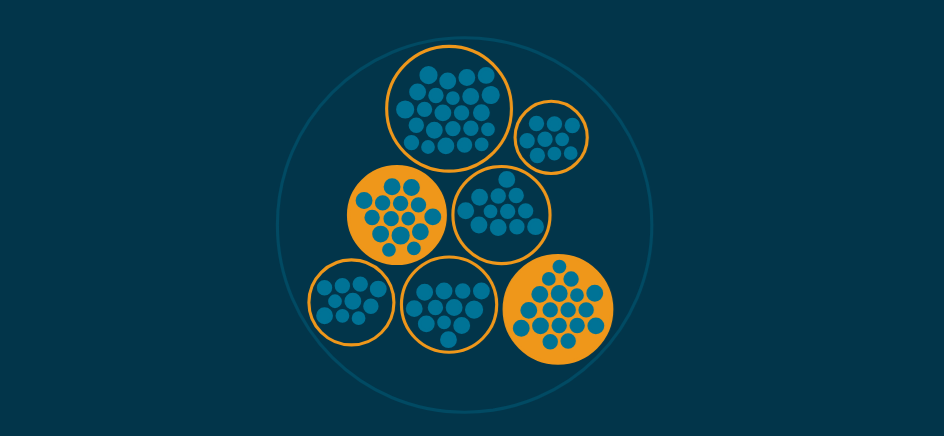
A circle packing chart visualizes hierarchical data using nested circles.
A single root element, the outermost circle, contains child circles, which may contain further circles, and so on. The deepest level consists of leaf nodes.
The circles are packed into their parent containers as efficiently as possible. Larger circles represent groups with greater aggregated weight, while smaller circles represent more granular elements. Colors, labels, and interactions such as hovering or clicking can help distinguish hierarchy levels.
Despite its simplicity, the chart is intuitive and visually appealing. It communicates structure quickly, often without requiring much explanation.
Why Is Circle Packing Useful?
Circle packing charts are designed to show hierarchy.
Parent-child relationships become immediately obvious because one element literally contains another. A common example is an organizational structure: the outer circle represents the company, nested circles represent departments and teams, and the smallest circles represent individuals.
In that sense, the visualization mirrors how traditional organizations are designed - and often how they are perceived.
At the same time, circle packing highlights a limitation that many organizations share: everything must fit into a predefined container. Someone who influences multiple teams or contributes beyond their formal role is still represented as a single circle at a specific level of the hierarchy.
The structure is accurate, but the story is incomplete.
Other hierarchical visualizations exist as well, including treemaps, tree diagrams, and radial trees. Each emphasizes different aspects of hierarchical data. Circle packing is particularly effective when you want a space-efficient overview that is easy to grasp at a glance.
Creating a Circle Packing Chart with D3
Building a circle packing chart with D3 follows three main steps.
1. Prepare the Hierarchical Data
The source data must be transformed into a hierarchy.
Even flat datasets such as CSV files can be converted using dedicated relationship columns. Nested JSON structures work naturally as hierarchical input. D3 provides utilities such as d3.stratify() and d3.hierarchy() to create a hierarchy with roots, descendants, and leaves.
2. Compute the Layout
Once the hierarchy exists, d3.pack() calculates positions and radii for every node.
At this stage, the data is enriched with everything required to render the visualization.
3. Draw the Visualization
Each node is rendered as a circle, typically using SVG. Position, size, color, and interaction are all driven by the computed layout. Labels, tooltips, or additional behavior can be layered on top as needed.
A simplified example:
// Read JSON source
...

// Transform it into a hierarchical structure
const [root, descendants, leaves] = JSONToHierarchy(hierarchyJSON);

// Calculate aggregated size
root.sum(d => getConnections(d));

// Configure the packing layout
const packLayoutGenerator = d3.pack()
  .size([.., ..])
  .padding(..);

packLayoutGenerator(root);

// Render circles
svg
  .selectAll(".pack-circle")
  .data(descendants)
  .join("circle")
    .attr("class", "pack-circle")
    .attr("cx", d => d.x)
    .attr("cy", d => d.y)
    .attr("r", d => d.r)
    .attr("fill", ..)
    .attr("stroke", ..)
  .on("mouseenter", (e, d) => {
    ..
  })
  .on("mouseleave", (e, d) => {
    ..
  });
One important caveat: circle packing charts are not always ideal on small mobile screens. Circles can become difficult to interact with, labels may be hard to read, and deeper levels can quickly lose clarity. In those situations, alternative layouts may provide a better experience.
When Structure Isn’t Enough
Hierarchies - in organizations or data - create order, but they never tell the whole story.
If you find yourself constrained by rigid structures or stagnating within predefined boundaries, consider exploring beyond them. Build something you care about. Learn a new technology. Join a community. Start a side project.
You don’t need to leave your organization to keep growing.
Want to learn more about data visualization?
➤ Download my checklist 10 Steps to Amazing Data Visualizations